4 Ways to Download Music From iPhone to Computers
Want to transfer songs from iPhone to computer but do not know how? This guide will cover 4 ways on how to transfer music from iPhone to computer with or without iTunes.
iPhone Data to Computer
- iPhone Photos to Computer
- iPhone Photos to Mac
- iPhone Albums to Computer
- iPhone Contacts to Computer
- iPhone Videos to Computer
- iPhone Music to Computer
- iPhone Texts to Computer
- iPhone Notes to Computer
- iPhone Apps to Computer
- iPhone Calendar to Computer
- iPhone Ringtones to Computer
- iPhone Voice Memos to Computer
AnyTrans – Transfer Music from iPhone to Computer in Seconds
AnyTrans provides the quickest way to download music from iPhone to computer. You can transfer iPhone music in just a few seconds. Supports the latest iPhone 16 and iOS 18.

As it’s impossible to access iPhone music directly on a computer, how to transfer music from iPhone to computer becomes a concern for iOS users. In this case, Apple developed iTunes for users to manage media files, developed iCloud for users to store content in the cloud, and developed AirDrop for users to transfer content from iPhone to iPhone.
However, iTunes only supports transferring purchased music and you can’t download repurchased songs from iPhone to computer. Moreover, the quick transfer method – AirDrop applies to iPhone and Mac, which is unavailable for Windows users. As a result, how to transfer music from iPhone to PC? Don’t worry, here we will introduce 4 ways on how to transfer music from iPhone to computer. Whether you are using a PC or a Mac, this post will help you.
Transfer Music from iPhone to PC Free with iTunes
Download Purchased iPhone Music on Computer from iTunes Store
Transfer iPhone Music to Mac Computer with Finder
Transfer Music from iPhone to Computer without iTunes
Due to the limitations with iTunes, the ultimate way to transfer music from iPhone to computer is using AnyTrans. It is a versatile iPhone transfer tool that allows you to download music from iPhone to computer, more than the purchased one. AnyTrans is available for both Windows and Mac computers. Besides, your music will be transferred together within just a few seconds. You can check the main features of AnyTrans in the following:
AnyTrans – iPhone Music Transfer
- Transfer both purchased and non-purchased music to computer.
- Add music to the iPhone from the computer without wiping data.
- No harm to transferred music files and other iPhone content.
- Transfer photos, contacts, messages, notes, and more.
Free Download100% Clean & Safe
Free Download100% Clean & Safe
Free Download * 100% Clean & Safe
Steps to Transfer Music from iPhone to Computer with AnyTrans:
Step 1. Download AnyTrans and install it on a computer. Open it and connect your iPhone to the computer. After it recognizes your device, you can see the category management part on the right side.
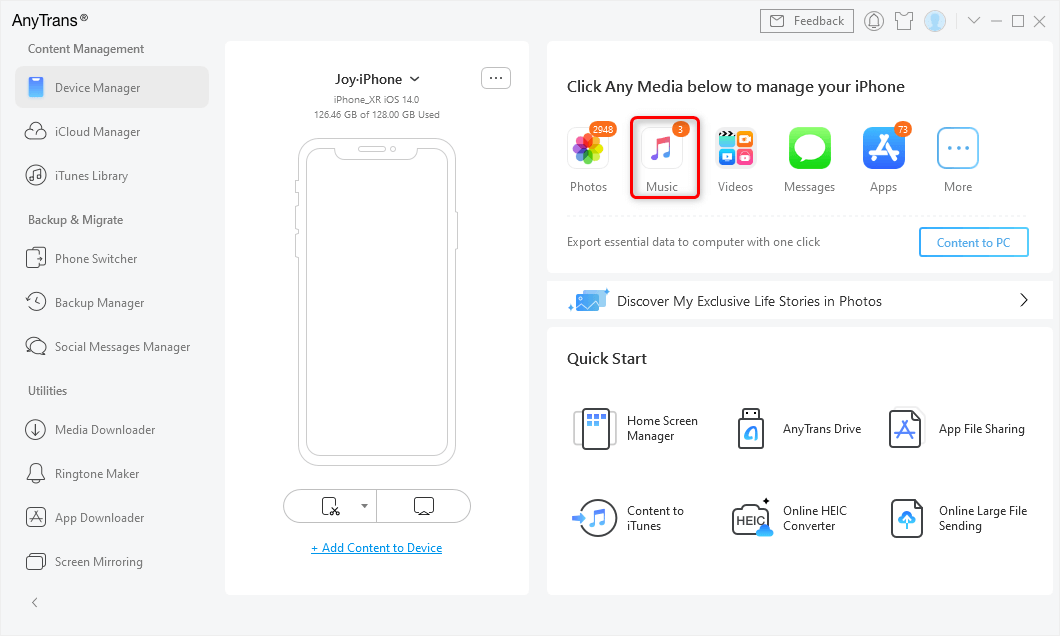
Choose Music in AnyTrans
Step 2. Click Music to enter the iPhone music file management page. Select the music you want to transfer. Then click the To Computer button to copy music from iPhone to computer directly.
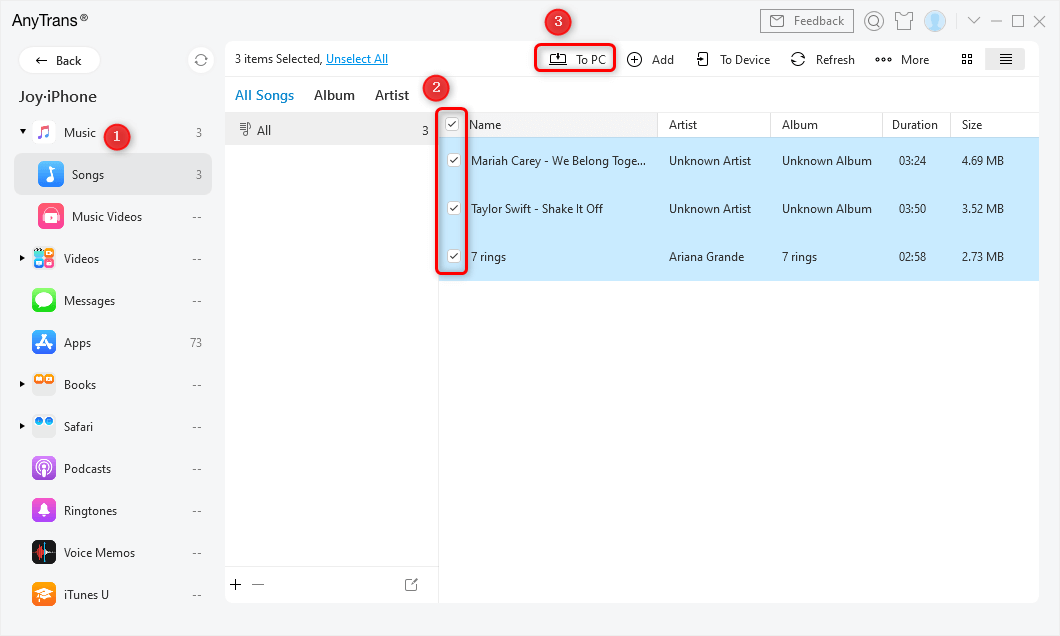
Select Songs and Click to PC/Mac
Step 3. Now you have successfully transferred songs from iPhone to the computer. Click on “View files” on the screen to have a check.
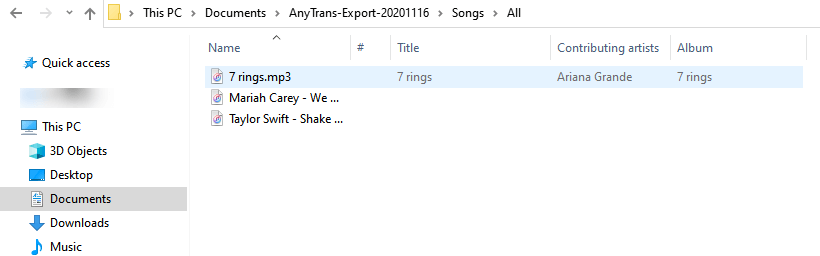
Check the Imported Music on Computer
AnyTrans will keep the original music quality after transferring to the computer. You can enjoy lossless songs on a laptop then.
Transfer Music from iPhone to PC Free with iTunes
Can I transfer music from iPhone to computer for free? Of course. iTunes is the best choice to download iPhone songs to computer without paying. As we mentioned, this method could only transfer purchased music to your iTunes. With iTunes, you can also add music on the iPhone, but there is no official way to import non-iTunes purchases from iPhone to iTunes. And considering iTunes errors happen all the time, it would be better for you to make a backup first.
Steps to transfer iPhone music to computer with iTunes:
Step 1. Download the latest version of iTunes on your computer > Connect your iPhone to your computer.
Step 2. Click File in the upper left corner of the iTunes window > Devices > Transfer Purchases from “your iPhone name”.
Step 3. If iTunes asks you to authorize your computer, go to Accounts > Authorization and choose to authorize the computer.
Step 4. Wait for the purchased music to finish transferring > Click Recently Added on the left side of the iTunes window > Choose the purchased music that you want to save > Click on the Download button. If you don’t see the Download button, the music is already on your computer.
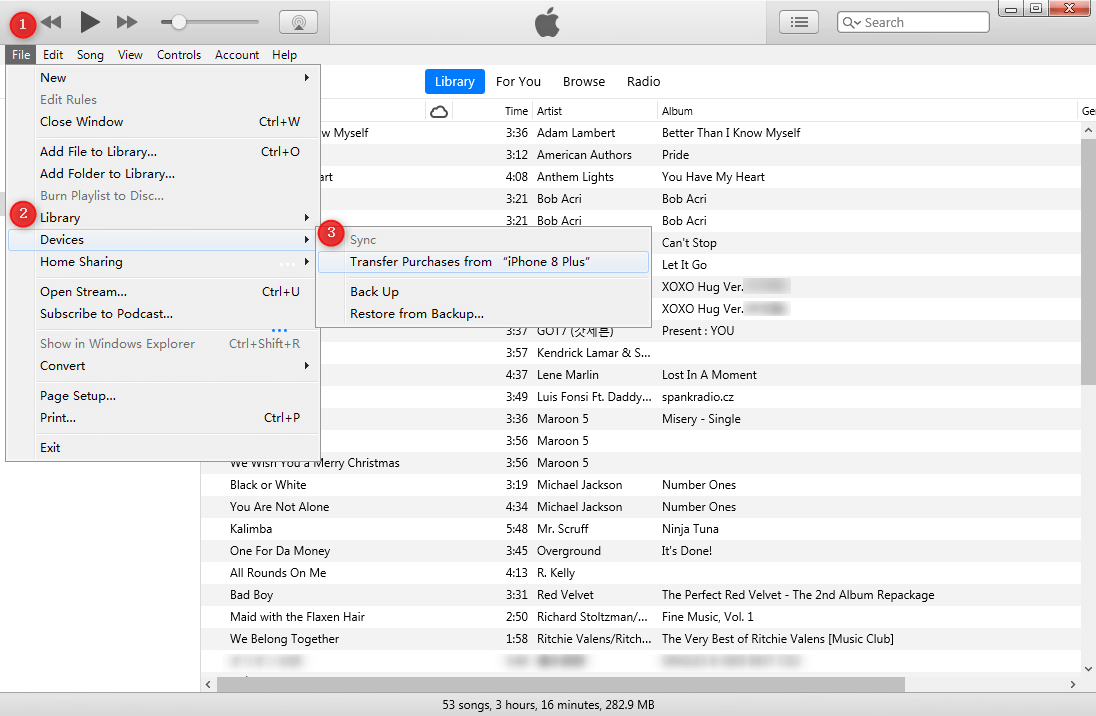
Transfer Music from iPhone to Computer with iTunes
That’s how to transfer music from iPhone to computer free with iTunes. Users who don’t want to cost a penny are recommended to try this method for music transferring.
Download Purchased iPhone Music on Computer from iTunes Store
Another way for transferring iPhone songs is to download purchased iPhone music to computer from iTunes Store. This method is also available for users who have accidentally deleted the music from their iPhone or iTunes, they can re-download it from iTunes on the authorized computers and devices (up to 10 total). No need to connect with your iPhone. Here are the steps:
Step 1. Open iTunes and click Account at the top of the iTunes window.
Step 2. Choose “Sign In” and enter your iCloud account (Apple ID) that you used to buy the music.
Step 3. Under “Account” > Click “Purchased” > “Music“.
Step 4. Click the “Not in My Library”.
Step 5. Click the download button to redownload the purchased music to your computer.
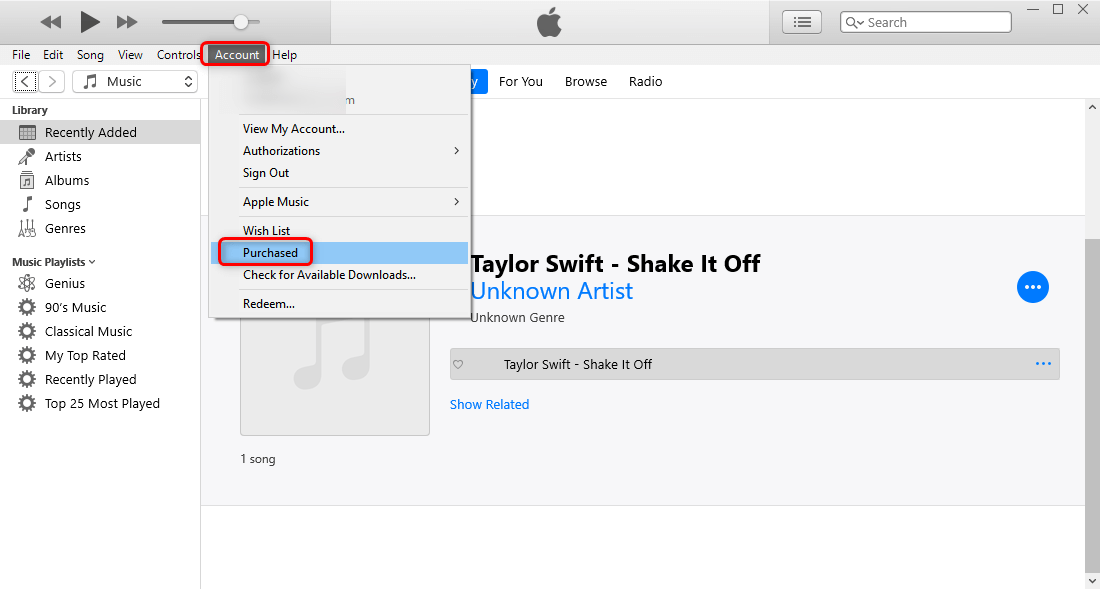
Re-download Purchased Music from iTunes
On macOS Catalina and later, there is no iTunes, but you can also download previously purchased music in the Music app on Mac.
Step 1. Open the Music app on your Mac, and click iTunes Store in the sidebar.
Step 2. If you don’t see iTunes Store in the sidebar, go to Music > Preferences > General > Make sure iTunes Store is selected > OK.
Step 3. Click Purchased > Click Music to see all your purchases and the ones not currently in your music library.
Step 4. Click the Download button to re-download the music you want.
Transfer iPhone Music to Mac Computer with Finder
If you are using a MacBook running macOS Catalina and later, you can use the Finder app to sync music from iPhone to Mac computer. Besides music, Finder supports transferring videos, photos, and other files from iPhone for free.
Steps to transfer music from iPhone to Mac computer with Finder:
Step 1. Launch the Finder app on your Mac. Then use a USB cable to connect your iPhone.
Step 2. Click your iPhone on the Mac computer and select Music from the top bar.
Step 3. Click Sync music onto your iPhone. Here you can choose what music files are to be synced on your Mac.
Step 4. Wait for the process to transfer music from iPhone to Mac with Finder. Don’t exit the app during the process, or your transfer can be interrupted.
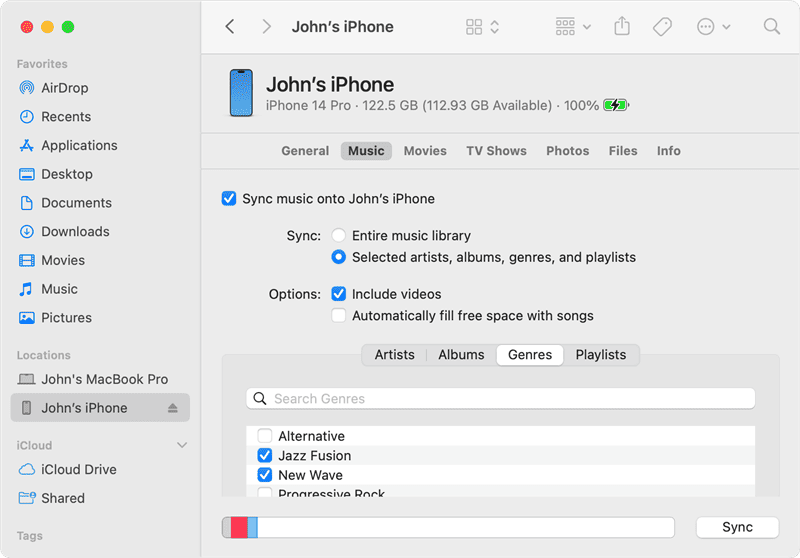
Sync iPhone Music in Finder
That’s the full process to transfer music from iPhone to Mac computer with the Finder app. You can try the steps to migrate your iPhone songs or use AirDrop to make the transfer on your Mac computer.
For iPod users, you can also learn how to add music to iPod without iTunes with detailed instructions.
Bonus Tip: How to Transfer Music from iPhone to Computer Wirelessly
When you do not have a USB cable at hand, or your iPhone cannot be recognized by your computer, you can try this tool to find a better way to transfer files – AnyTrans app on iPhone, which can easily help you to transfer music from computer to iPhonewirelessly.
Now follow the steps below to transfer music from computer to iPhone X/XS/XR wirelessly. Make sure both your computer and iPhone are connected to the same Wi-Fi network, and cellular data would not work in the following steps.
Step 1. Install AnyTrans app on your iPhone.
Step 2. On your computer: Enter anytrans.io in your browser, then you shall see a QR code on this page with your iPhone AnyTrans app.
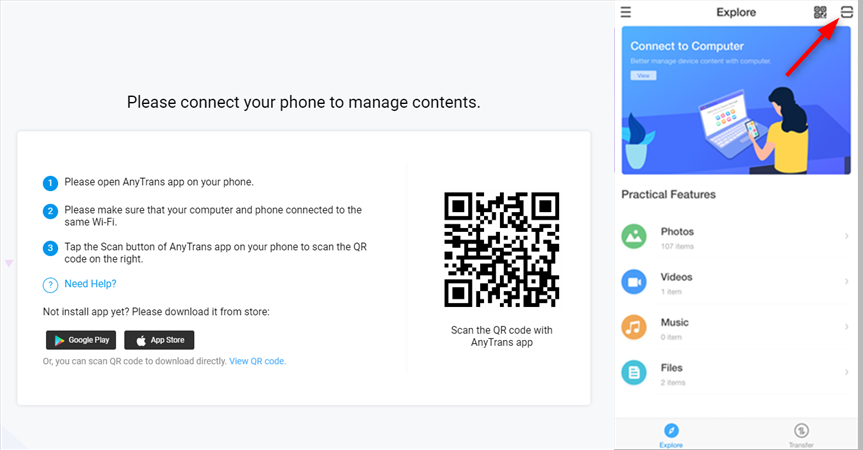
How to Transfer Music from iPhone to Computer Wirelessly – Step 2
Step 3. On your iPhone: Select the music you want to transfer and click Send button.
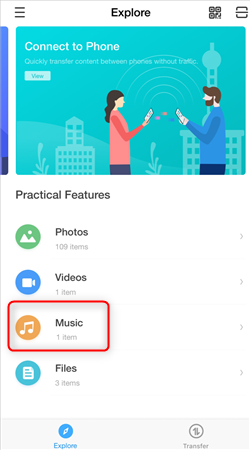
How to Transfer Music from iPhone to Computer Wirelessly – Step 3
The Bottom Line
There are 4 ways available to transfer music from iPhone to computer, including free or paid solutions. For a quick and safe transfer, AnyTrans is highly recommended for its accurate scanning and clear instructions. But if you want to download music from iPhone to computer for free, using iTunes on Windows computer or the Finder app on Mac computer. No matter which method you prefer to use, we hope you can copy music from iPhone to computer without effort.
Free Download * 100% Clean & Safe
More Related Articles



Senior writer of the iMobie team as well as an Apple fan, love to help more users solve various types of iOS & Android-related issues.
Product-related questions? Contact Our Support Team to Get Quick Solution >
